

Tideline
EN DE
The offline logger for Wavelog

Log where you operate. Sync when the network is back.

Tideline is the open-source app for radio amateurs: log QSOs offline on a summit, in a park or in a contest, and sync them with your own Wavelog – traceable, QSO by QSO.

Open source (MIT) · no account with us · no tracking · iOS, iPadOS, Android, macOS, Windows · Current version 1.0.0

Four ideas everything is built on

  1. 1 / 4

    Offline is normal

    Everything except the sync itself works with no connection – including DXCC lookups, reference lists and “worked before” hints.

  2. 2 / 4

    Sync you can follow

    Every QSO shows its state: local, queued, uploading, synced, conflict or rejected. When the server objects, the app says why in plain language. Nothing is silently lost or duplicated.

  3. 3 / 4

    Built for the field

    Glove mode, sunlight theme, night red, battery saver and keep-screen-on – plus full use with a screen reader and a keyboard.

  4. 4 / 4

    Secure and private by design

    No telemetry, no ads. The API token lives only in the operating system's secure store, with least privilege.

An activation day with Tideline

An illustrated walk-through – how the features fit a typical day in the field.

01

Before: download the reference list

At home you download the SOTA, POTA or WWFF list from the official source. From then on you search for the summit or park offline – by name or distance.

02

Up top: no signal, no problem

Start the activation, set reference and locator, log. Every QSO is saved at once. The sunlight theme and glove mode help in wind and cold.

03

On the way to a valid activation

Progress shows how many QSOs are still missing – as text, also for screen readers. You enter park-to-park and summit-to-summit per QSO.

04

Back down: sync you can verify

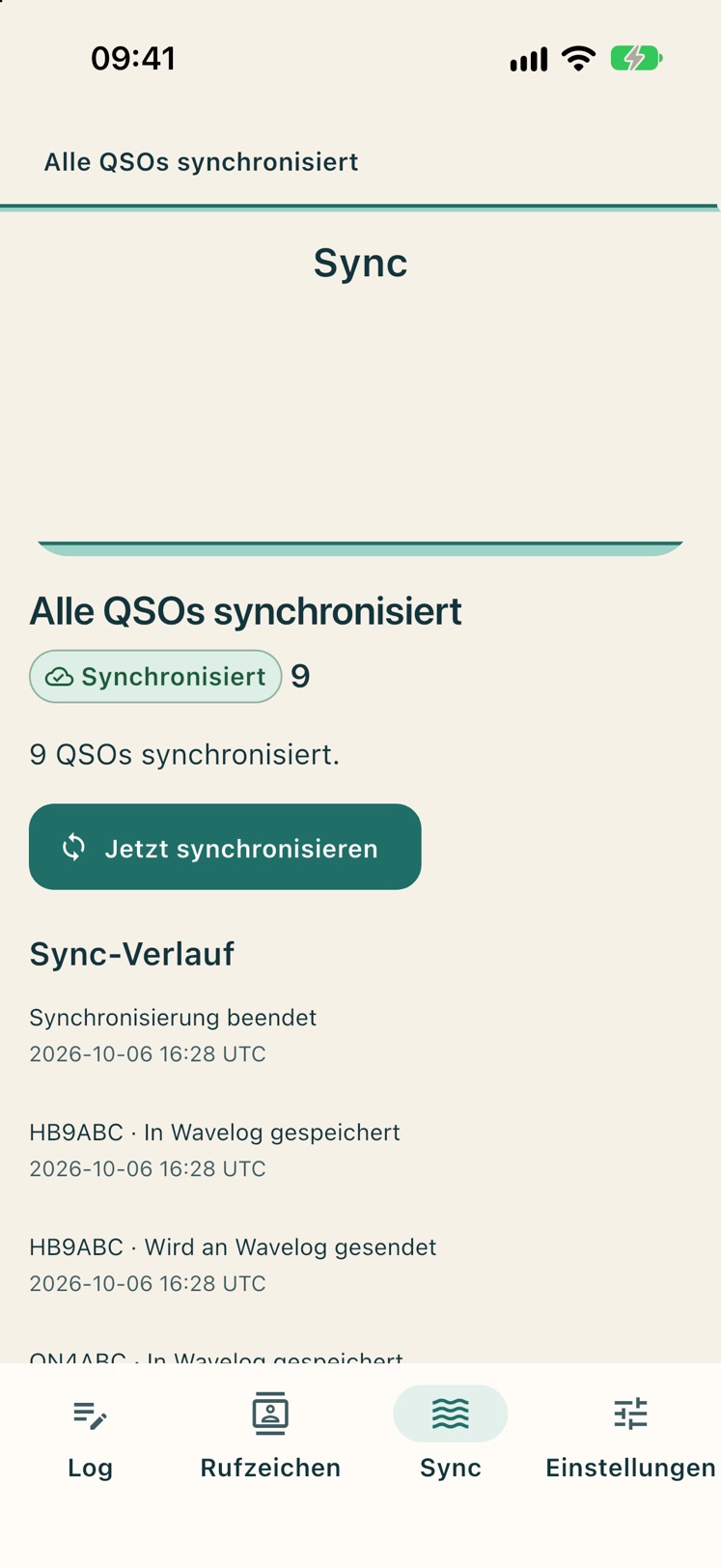
As soon as there is a network again, everything goes to your Wavelog. You see per QSO what happened – and why, if something went wrong.
Features – by situation

What Tideline does depends on where you are sitting. Everything listed here is in version 1.0.

Activation (SOTA · POTA · WWFF)

Summit, park, forest – no signal.

  • You download the reference lists yourself from the official sources, then search offline by name or distance.
  • Progress toward a valid activation, also as text: POTA 10, SOTA 4 and WWFF 44 QSOs (default rules, checked in October 2026).
  • Park-to-park and summit-to-summit: enter the other station's reference per QSO.
  • MY_SOTA_REF, MY_POTA_REF and MY_WWFF_REF go into the QSO automatically.
  • ADIF export of a single activation.

Contest

Keyboard first, speed over decoration.

  • Keyboard entry in a dense layout; serial numbers that never repeat.
  • Dupe checks and super check partial from the MASTER.SCP you download yourself.
  • Live rates and multipliers; edit without leaving contest mode.
  • Bundled definitions: CQ WW, CQ WPX, ARRL DX, IARU HF, DARC WAG and generic templates.
  • Cabrillo export and Wavelog contest sessions (Wavelog 3.2 or newer).

Field Day & portable operation

Many QSOs, little time, changing operators.

  • Fast Log Entry: type QSOs as shorthand, see how each line was read, log them all at once (Wavelog SimpleFLE dialect).
  • Field mode in one switch: sunlight theme, glove mode, battery saver, keep screen on.
  • Generic contest templates for serial-number or exchange contests. There is no dedicated Field Day definition.
  • Several Wavelog accounts and station profiles, switchable on the log screen.

Station at home

The calm part: maintain, check, tidy.

  • “Worked before” hints from your Wavelog log; DXCC lookup offline.
  • Callsign directory built from your QSO history, with your own notes (local only).
  • ADIF import and export, backups, optional app lock with biometrics.
  • Free up space: remove local copies of QSOs already synced. Nothing is deleted on Wavelog.
  • On Mac and Windows it behaves like a desktop program: sidebar, menu bar, keyboard shortcuts.

Planned – not included yetplanned

  • Device-to-device sync over local Wi-Fi, no internet
  • WSJT-X listener on the desktop
  • Rules editor for activation counting, and two-fer activations
  • Background sync on Android

The app at a glance

Phone, tablet and desktop share one logic. The images come from the app’s demo and show sample data; the app is shown in its German interface.

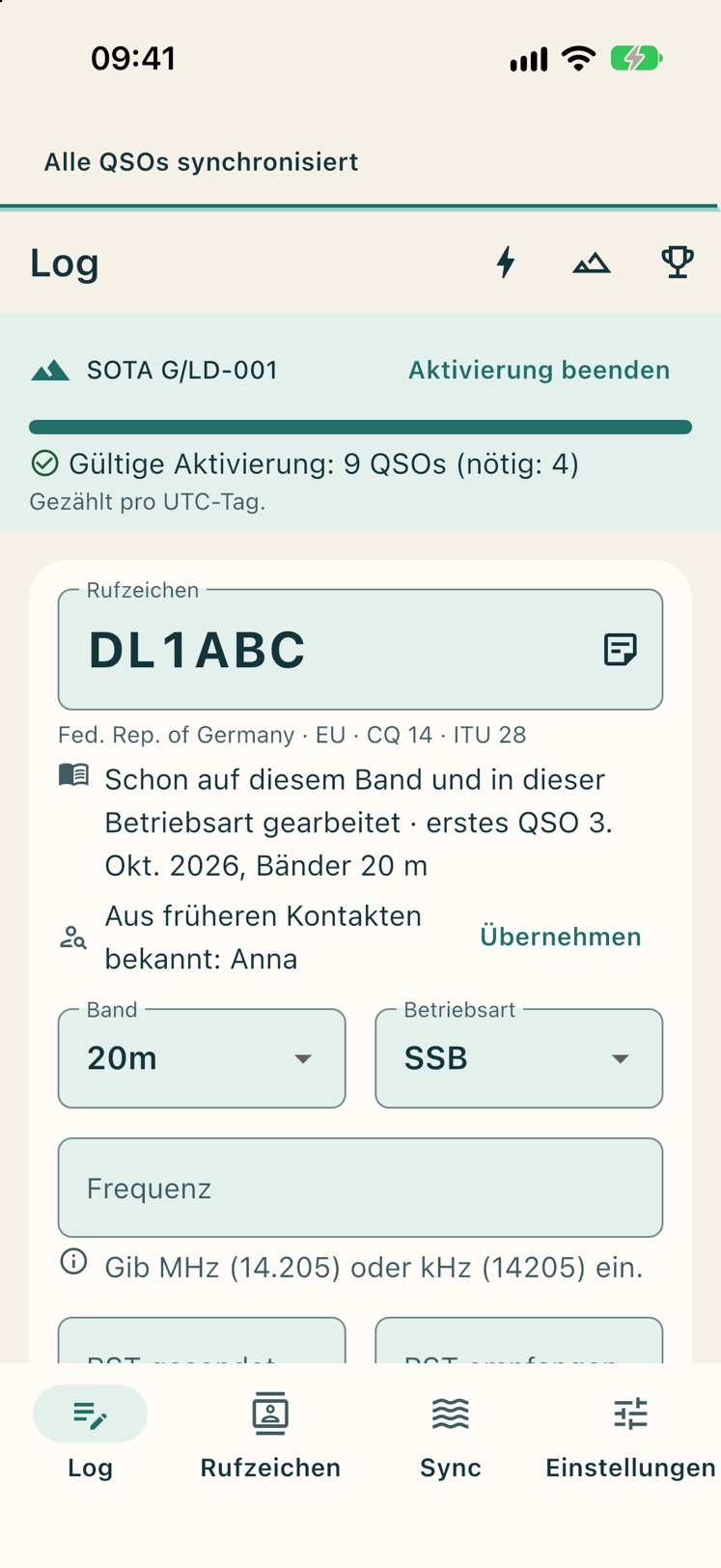
Tideline on iPhone: log screen with a running SOTA activation, a progress bar reading “Valid activation: 9 QSOs” and the callsign field showing DL1ABC (German interface)
Log with a running SOTA activation (iPhone)
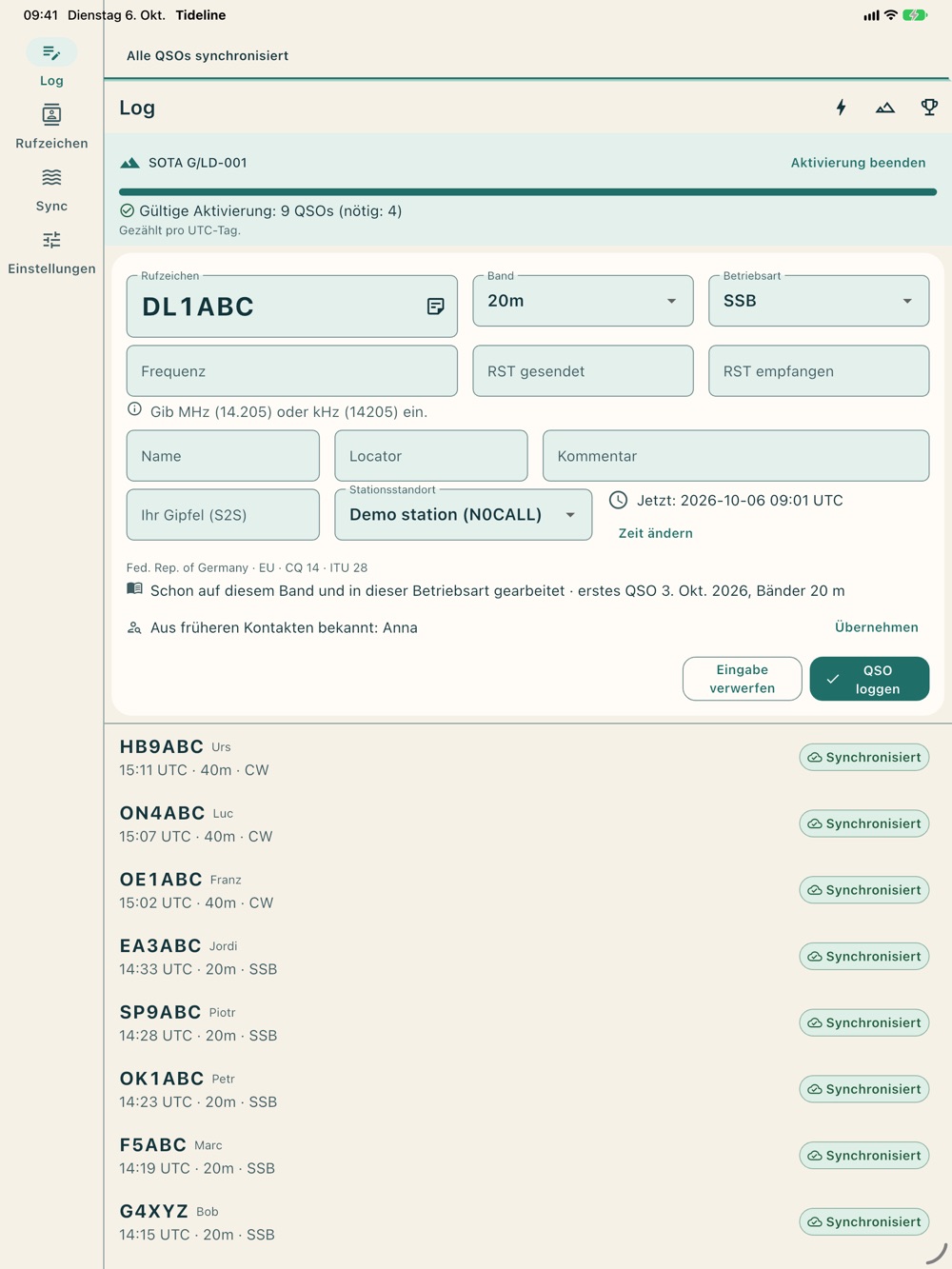
Tideline on iPad: sidebar, entry form and a list of recent QSOs, all marked “Synced” (German interface)
Log on iPad: entry and QSO list
Tideline on iPhone: sync screen reading “All QSOs synced”, a “Sync now” button and the sync journal (German interface)
Sync status and journal (iPhone)

Four themes for every kind of light

  • Light – sand and seafoam
  • Dark – deep sea
  • Sunlight – maximum contrast
  • Night red – one colour on black

Accessibility: part of the work, not an afterthought

The target is WCAG 2.2 AA. Contrast is checked in tests, not by eye.

  • Text ≥ 4.5:1, controls ≥ 3:1, sunlight theme ≥ 7:1 – tested automatically.
  • Text scales up to 200% with no clipped content.
  • Status is never colour alone: always an icon and text.
  • Screen readers spell callsigns letter by letter (“D O 1 H O Z”).
  • Full keyboard use with a visible focus; motion follows “reduce motion”.
  • VoiceOver and TalkBack hand tests are done for 1.0, according to the changelog.

Privacy: a promise the app keeps

Tideline collects no data about you. There is no telemetry, no analytics, no advertising, no crash-reporting service and no tracker. The developers never receive your data.

  • Your log stays on your device – and on your own Wavelog server.
  • It connects only to your Wavelog and – when you press “Download” – to the visible reference-list sources.
  • No location, no camera. You type the locator yourself.
  • The API token lives only in the Keychain, Android Keystore or Windows protected storage.
  • The database and backups are excluded from iCloud, iTunes and Android backups.

To be straight about it: Tideline encrypts nothing of its own. Protection on the device comes from the operating system; exported backups are plain files – keep them safe.

Requirements

Wavelog
Version 3.1.0 or newer with API v2. Contest sessions need 3.2.0+.
API token
Required: qso:read, qso:write, station:read. Optional: contest:read/write, qso:delete, lookup:read. The app explains each scope during setup.
Operating systems
iOS / iPadOS 16 · Android 7.0 · macOS 12 · Windows 10 (1903)
Try without a server
“Try the demo” on the Welcome screen – no Wavelog and no network connection needed.

Built in the open

Tideline is licensed under the MIT licence. The source code, decision records and roadmap are public.

There are good alternatives – for example Wavelog Mobile, the DA6IT Wavelog Offline Logger, CloudLogOffline or HAMRS. Tideline aims to complement them, not replace them: one codebase for five platforms and a visible sync state per QSO. A comparison table is in the README.

Frequently asked questions

Do I need a Wavelog?

To sync, yes: Wavelog 3.1.0 or newer with API v2. To try the app there is a built-in demo account that needs no server and no network.

Does Tideline really work with no signal?

Yes. Logging, DXCC lookup, reference and “worked before” hints all run locally. Only the sync itself needs a connection – it starts as soon as one is there.

What happens if Wavelog rejects a QSO?

The QSO is kept with the state “rejected”, and the app explains why in plain language. Nothing is silently dropped or replaced.

Does it cost anything?

Tideline is open source under the MIT licence. On the App Store the app is free.

Is my data encrypted?

The app does no encryption of its own (only TLS in transit and the OS secure store for the token). The database is protected by the operating system; backups and exports are unencrypted.

Is there a Field Day definition?

No. There are generic templates for serial-number and exchange contests; Fast Log Entry and field mode help with speed.

What about WSJT-X?

A WSJT-X listener for the desktop is planned but not included yet.

How does Tideline differ from other apps?

There are several good tools. Tideline focuses on one codebase for five platforms, offline-first and a visible sync state per QSO. Try what fits your way of operating.

Get Tideline

For iOS, iPadOS, Android, macOS and Windows – plus Linux (x86-64 and arm64).

SHA-256 checksums are attached to every GitHub release.